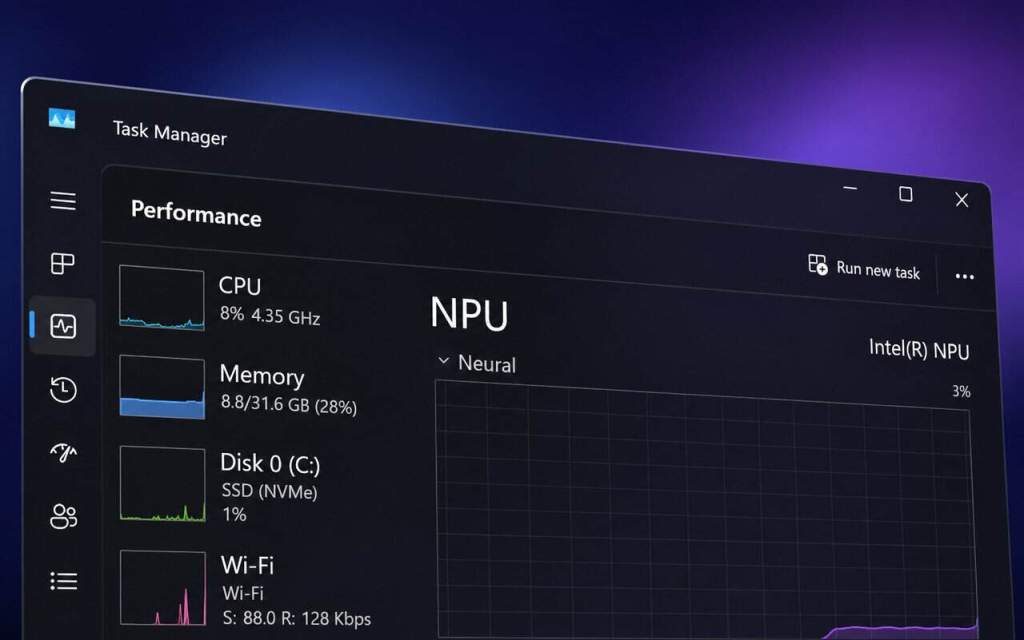
Microsoft is expanding Task Managerwith updated metrics that simplify the visibility of how Windows 11 applications utilize AI hardware.
The updates introduce process-level tracking for NPUs, GPU neural engines, and memory allocated for AI tasks. Microsoft will maintain the new columns as optional, allowing users to activate them only when necessary.
Task Manager introduces NPU monitoring
Microsoft is introducing two new columns named NPU and NPU Engine.
They will be visible on the Processes, Users, and Details pages, indicating which applications or background processes are currently utilizing the system’s NPU.
This could simplify determining if an AI-powered application effectively utilizes specialized neural processing components rather than depending on the CPU.
You can also monitor NPU memory consumption.
The Overview page will include two new metrics: NPU Dedicated Memory and NPU Shared Memory.
These columns indicate the amount of memory each process utilizes via the NPU.
The data might be particularly helpful when multiple local AI programs operate simultaneously and vie for existing resources.
GPU neural processing units will be visible in Task Manager
Microsoft is also enhancing the Performance page to display neural engines embedded within GPUs.
Apps that utilize specialized GPU AI hardware may be listed as GPU – Neural in the GPU engine section.
This provides users with a broader perspective on AI acceleration involving both NPUs and GPUs, rather than restricting oversight to conventional CPU and graphics tasks.
Task Manager can reveal applications reverting to the CPU
The updated metrics can also assist in detecting applications that do not utilize available AI accelerators.
If an application executes an AI task on the CPU rather than using an NPU or GPU neural engine, it may result in extended processing times and higher usage of system resources.
Microsoft is providing users with a method to verify if AI software utilizes the hardware as designed.
Microsoft is also introducing an Isolation column
The Task Manager will also include an optional Isolation column on the Processes and Details tabs.
Users can activate it, together with the updated NPU metrics, by right-clicking a column header in Task Manager and choosing the specific metric they wish to view.
The updates emphasize Microsoft’s increasing emphasis on localized AI operations in Windows 11, as NPUs and specialized neural processors become more prevalent in newer computers.
In related news, Lenovo has established a distinct 16GB cap for Copilot+ devices, while Microsoft temporarily disabled Ask Copilot on the Windows 11 taskbar.
Windows 11 might also soon allow usersManage privacy settings for specific Win32 applications.





Leave a Reply